
Build a phone menu that says "press 1 for sales"
A phone menu (an IVR or auto attendant) answers a number with a greeting, then sends each caller to the right team: “For orders, press 1. For deliveries, press 2.” Here’s how Northwind Traders builds one for its main number, tries it, and puts business hours in front of it. You need the phone system from Freesbe, and to be an owner, admin or Phone admin.
1. Plan the keys
Section titled “1. Plan the keys”Write down what callers ask for and who should get each one. Keep it short: three or four choices and a way to leave a message is plenty. For Northwind:
- 1 Orders: rings Priya and Sam together.
- 2 Deliveries: a second menu with its own keys.
- 3 Billing: rings James.
- 0 Leave a message: Sam’s voicemail.
If one team should share calls fairly, make a ring group first and point a key at it. If a team gets more calls than it can answer at once, a call queue holds callers in line instead.
2. Build the menu
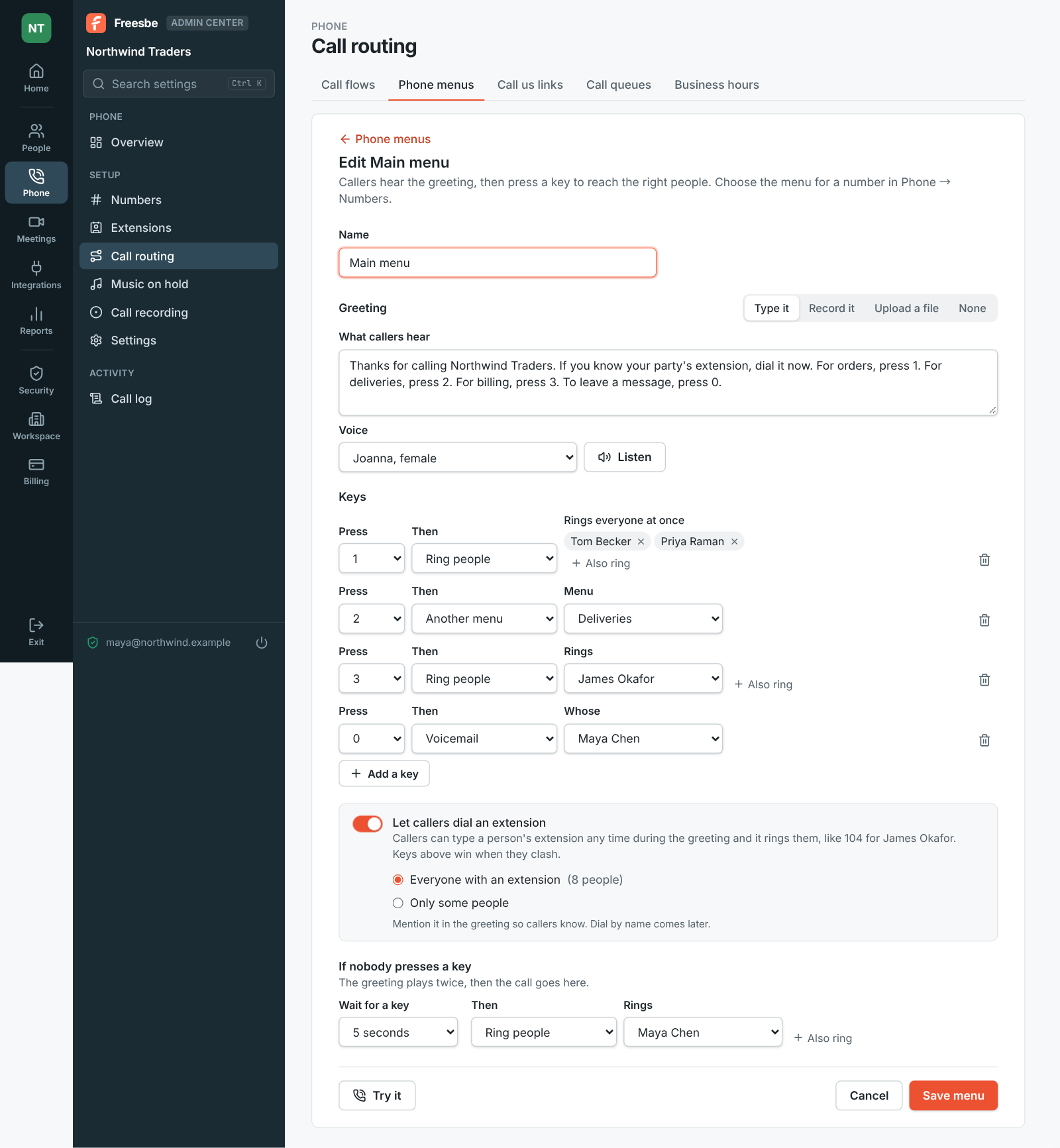
Section titled “2. Build the menu”- Open the Admin Center, then Phone → Call routing → Phone menus, and click Add a menu. Give it a Name, like Main menu.
- Set the Greeting. Type it and pick a Voice to have it read out (Listen plays it first), Record it with your microphone, or Upload a file (MP3, M4A or WAV, up to 5 minutes). Say the choices in the order of the keys, and if you record calls, say so here: “This call may be recorded.”
- Under Keys, choose what each key does: Ring people, Ring group, Voicemail, Another menu, Call queue or Hang up. Add a key adds up to 12: the digits, * and #.
- Turn on Let callers dial an extension so regular callers can reach someone directly, with Everyone with an extension or Only some people. Add “If you know your party’s extension, dial it now” to the greeting. Keys you set win when they clash with an extension.
- Under If nobody presses a key, set how long to Wait for a key and where the call goes then. The greeting plays twice first.
- Click Save menu.
For the Deliveries menu, make a second menu the same way and pick it under Another menu for key 2 of the main one.
3. Try it without a phone
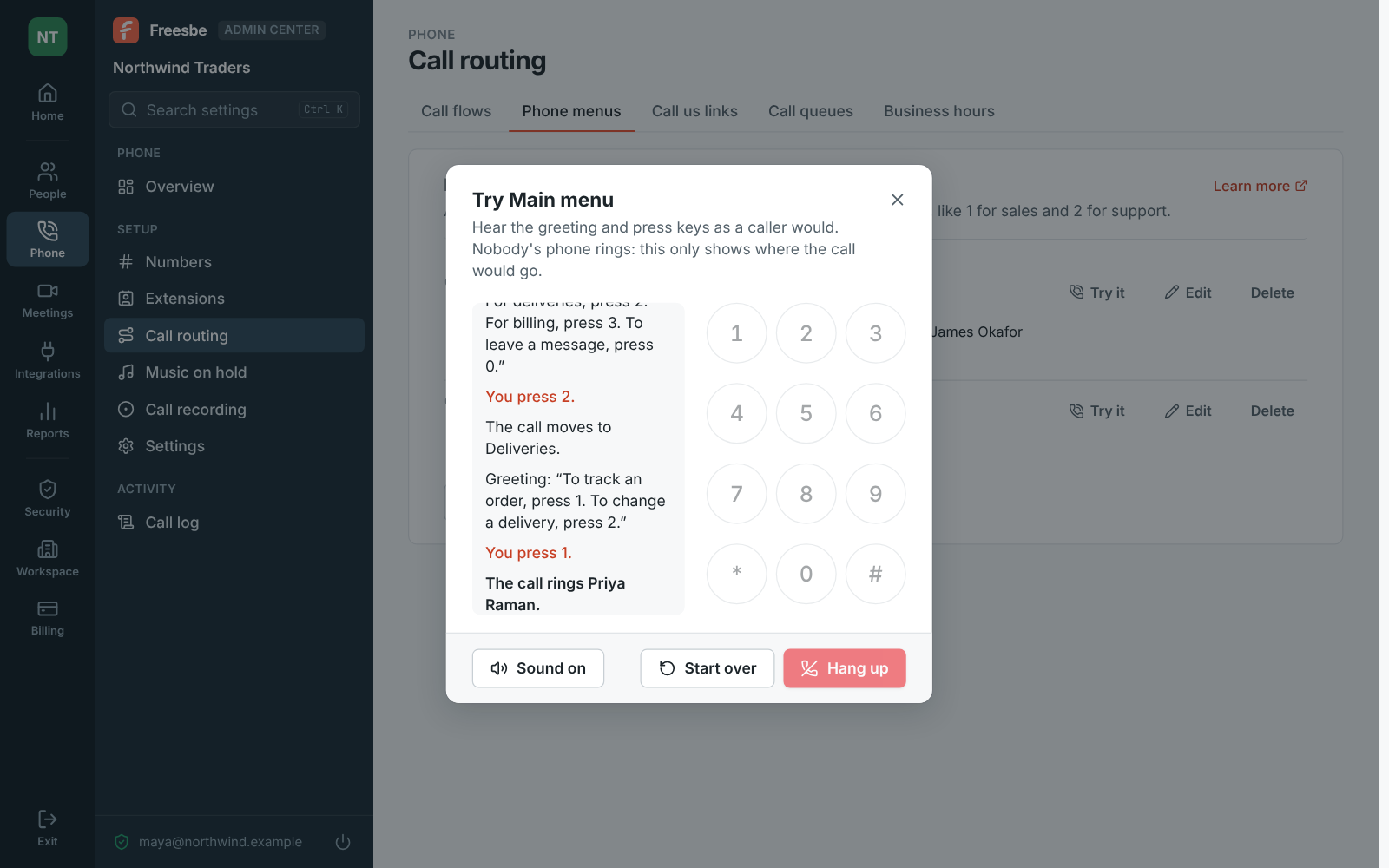
Section titled “3. Try it without a phone”Click Try it, next to the menu in the list or at the bottom of the editor. The greeting plays, and the keypad presses keys as a caller would: you see each step and where the call ends up, like The call rings Priya Raman. Nobody’s phone rings. Sound off follows the steps without playing the greeting, and Start over calls again.
4. Point your number at it
Section titled “4. Point your number at it”Open Phone → Numbers, click the number and change Answers with from Ringing people to the menu. Callers hear the menu from the next call. To go back, choose Ringing people and pick who it rings. A menu can’t be deleted while a number answers with it or another menu sends calls to it.
5. Add business hours
Section titled “5. Add business hours”Nobody wants a menu to ring an empty office. Set your hours in Phone → Call routing → Business hours, then open the number again and turn on Follow business hours. Choose where calls go After hours and On holidays: voicemail, a menu, a queue or hanging up. The details, including importing public holidays, are in Set business hours and holidays for your numbers.
See the whole thing drawn
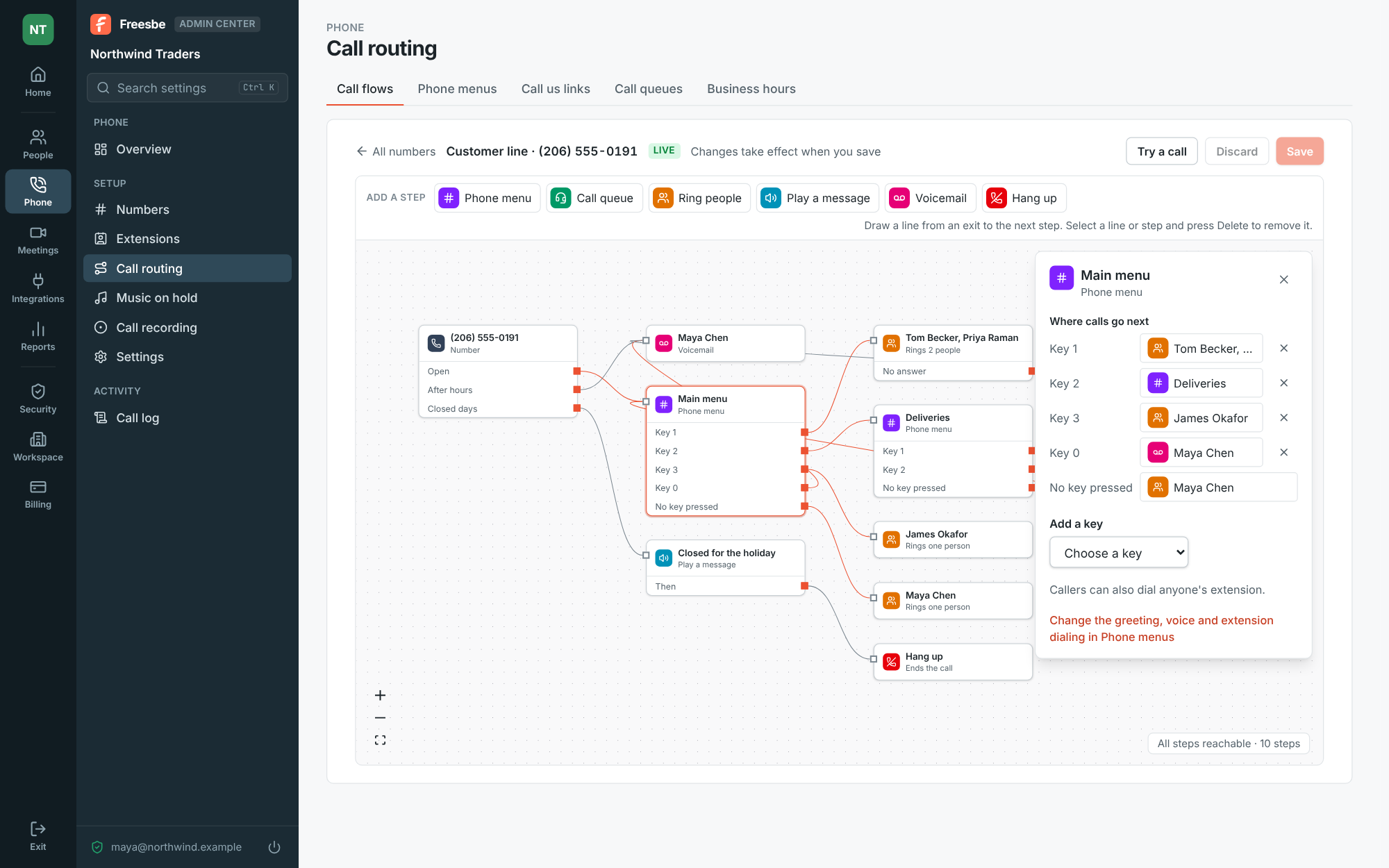
Section titled “See the whole thing drawn”Phone → Call routing → Call flows draws what happens when someone calls the number: its Open, After hours and Closed days exits, the menu with a line from each key, and where each one ends. Click Open next to the number, or Call flow next to it in Phone → Numbers. Drag a line from an exit to another step to change where calls go, and Add a step puts a Play a message step in, like “We’re closed for the holiday.” Click Save and the changes are live right away.
- Greetings you type, record or upload count toward the phone greetings your plan makes a day. Get the wording right in Listen before you save.
- Put the most common choice on key 1 and voicemail on 0, which callers expect.
- Menus can be part of more than one number’s flow, so changing a menu changes it everywhere.
See Phone menus and Call flows for every option.
Answers come from the Freesbe guides and are written by AI, so check the linked guide before relying on one. Please don't include personal details such as emails or passwords.