
Set up a team booking page for demos
A team booking page is one link for several people, like a product demo anyone on the sales team can take: a time shows when any of them is free, and the booking goes to one of them. This sets up Northwind’s demo page, shared evenly across four reps, and shows each rep how to pause themselves. An owner or admin makes it in the Admin Center.
Before you start
Section titled “Before you start”- Team booking pages come with the Corporate and Enterprise plans. A page stops working if the workspace moves to a plan without them.
- Each person on the page should connect their calendar. The page can only see someone’s other appointments through it, and on a round robin page a person without one gets no bookings while someone else on it has a calendar connected, so a booker never lands in a meeting the page couldn’t see. Ask the team to connect first.
- Guests can’t take bookings.
1. Make the page
Section titled “1. Make the page”- Open the Admin Center, then Meetings → Team booking pages, and click New team booking page.
- On the Page tab, give it a title, like Product demo, and a link, like
app.freesbe.net/b/northwind-demo. - On People, under How bookings are shared, pick one:
- Round robin: a time shows when anyone on the team is free, and the booking goes to one of the people free then. Spread them evenly gives it to whoever had the fewest bookings through the page in the last 30 days. In the order below gives it to the first person in the list who’s free, so the others only get the times they’re busy.
- Everyone together: a time shows only when everyone is free, and they all join. Use it for an onboarding call that needs both the account manager and the engineer.
- Under People, add up to 20 members. With In the order below, use the arrows to set the order.
- On Hours, Questions and Options, set the lengths, hours, notice, questions and the protection switches as for a personal page (see Set up a booking page). The hours are the team’s, the same for everyone.
- Click Create page, at the bottom on every tab. The preview on the right shows what bookers see.
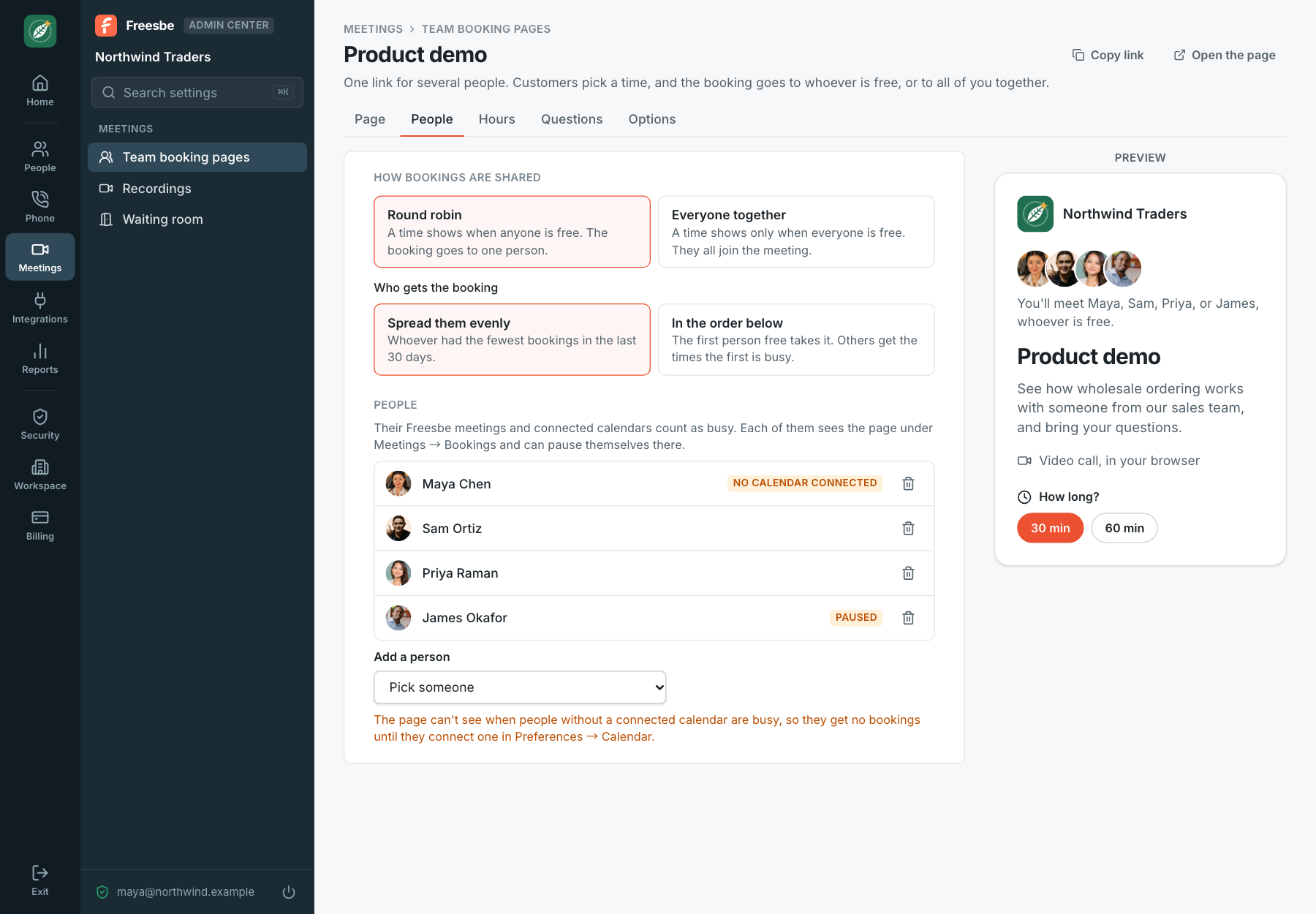
The editor marks anyone without a calendar No calendar connected. If nobody on the page has one, everyone takes bookings during the page’s hours, with only their Freesbe meetings counting as busy.
2. Check what bookers see
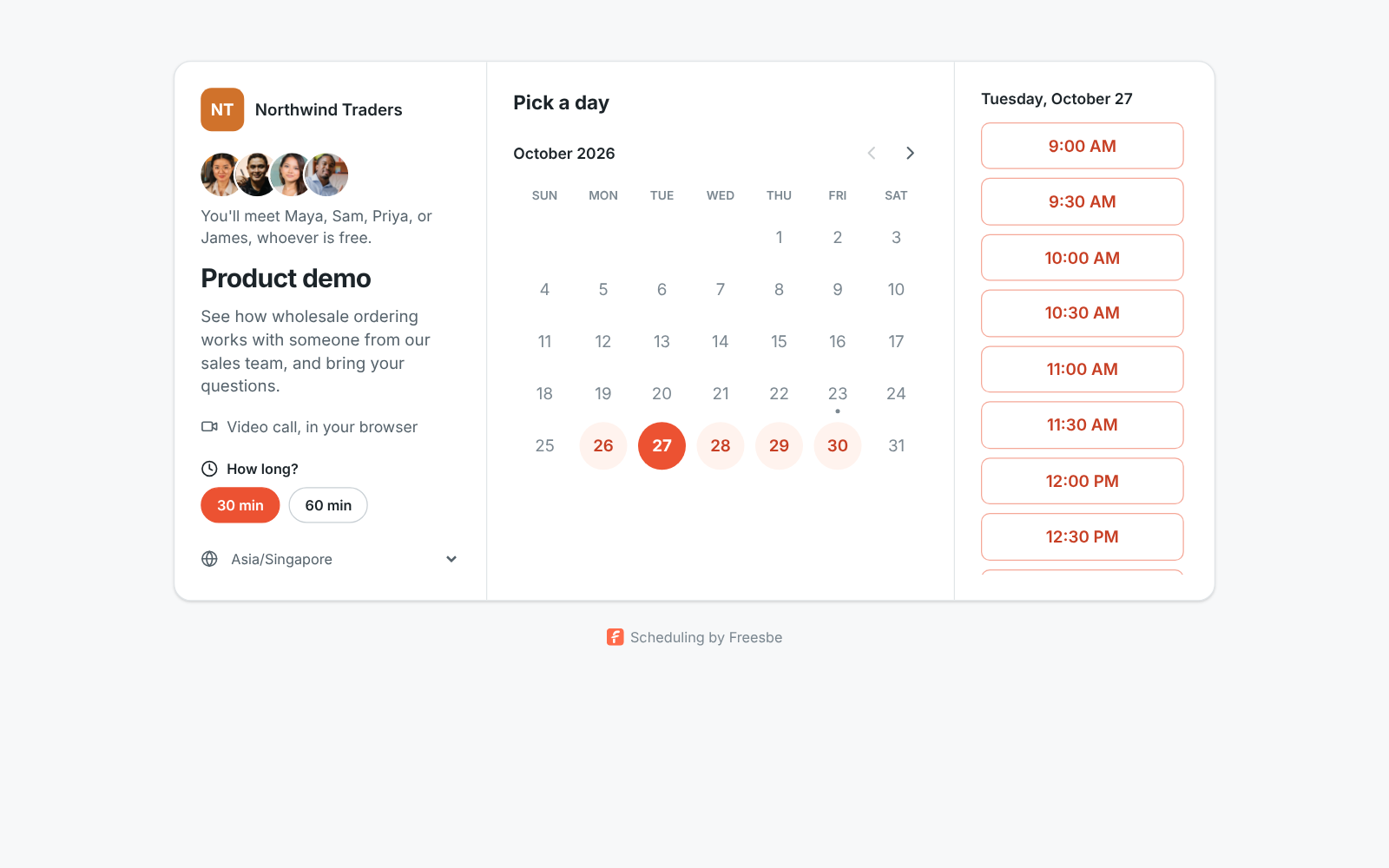
Section titled “2. Check what bookers see”The page shows the team’s photos (turn off Show their profile photos to hide them) and says who the booker will meet: “You’ll meet Maya, Sam, Priya, or James, whoever is free.” It always lists everyone on the page, including people who paused themselves or have no calendar, so it never gives away who’s away or busy.
3. Tell the team how it works for them
Section titled “3. Tell the team how it works for them”- A round robin booking is a meeting with the person who got it; a together booking invites everyone. Each gets the invite, and their own When someone books time with you workflows run.
- Everyone on the page sees it in Meetings, under Bookings, below their own pages. Going on holiday? Turn off Taking bookings there: their times stop showing and no bookings go to them, while colleagues keep taking them. Only an admin can change the page itself, or pause it for everyone from its editor.
- If someone moves a round robin booking, it stays with the same person and only their free times show.
- Post new bookings to #sales with a workflow that starts When someone books time with you, with Their company and Their team size in the message, so the rep who got it can prepare. See Workflows.
- A workspace can have up to 50 team booking pages, and each page takes up to 30 bookings a day.
- With a custom domain, the team page moves to your company’s address along with everyone’s personal pages.
See Team booking pages for every setting.
Answers come from the Freesbe guides and are written by AI, so check the linked guide before relying on one. Please don't include personal details such as emails or passwords.